Keep your business in Buffalo moving with IT support that resolves issues quickly, protects your systems, and prevents downtime from disrupting your team.
Beyond IT Support. Your Partner in Progress.
meet the New England IT team you can rely on





Linda Weller
President
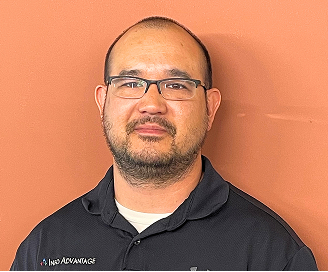
Chris Chan
Sr. Director of Solution Sales

Mitch Weller
Executive Vice President

Nick Wetherwax
Sr. Director of Technical Solutions

Mike Minch
Client Success Representative

Jacob Weller
L1 Engineer

Rikki Weller
Marketing Executive

Brian Moss
Solution Sales Representative

Chris McDonald
L2 Engineer

Matt Frosini
L2 Engineer
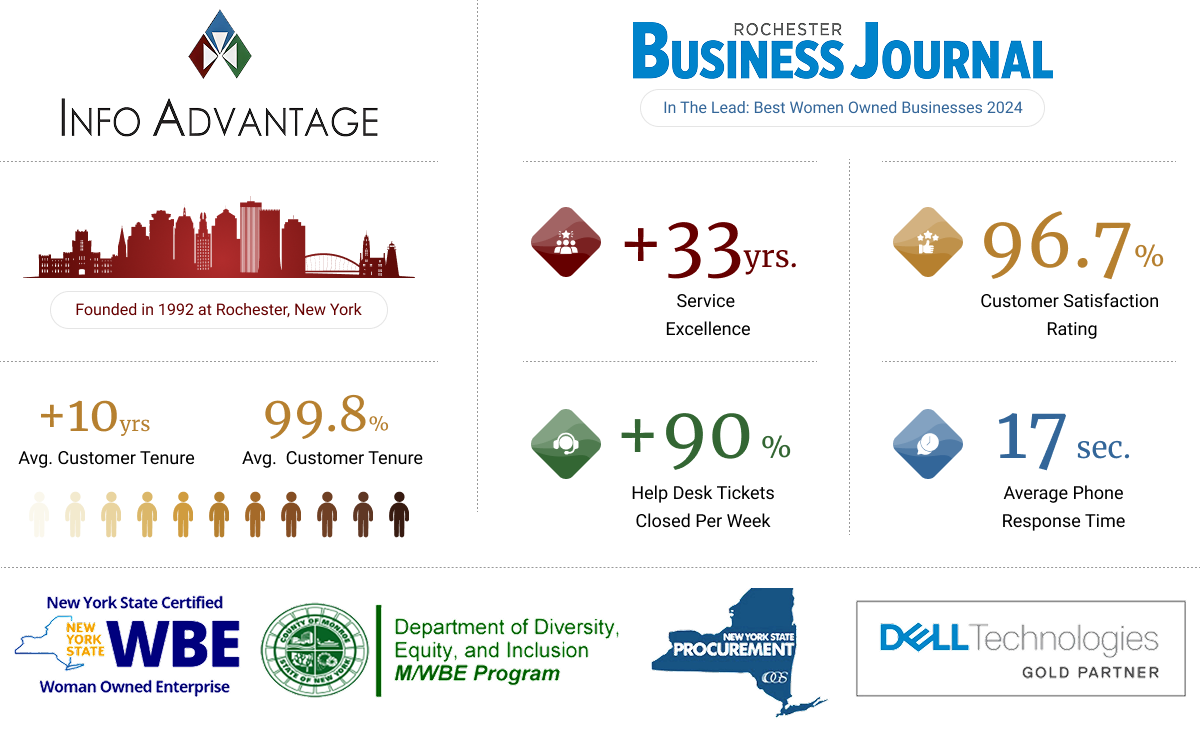
We love conversations with our clients but it's our work that does the real talking.
“We needed help it was only a phone call away”
“We enjoyed another successful year at Hoag Library in no small part due to our relationship with Info Advantage. With the help of Johnathan and Linda we replaced many of our computers this year and have finally gotten all of our equipment onto a three year cycle for replacement. The installation of the new computers was handled in house knowing that if we needed help it was only a phone call away. Jeremiah was instrumental in helping us get all of the new equipment online and swapping out some other equipment with items that were at the end of life. Other times we have depended on Jacob to help us figure out why we were having problems. (an unknown power outage was one cause.) and he and Kris reset programs when we could not make successful updates. We were also unable to catalog new books when the dedicated computer went down. We sent the computer to IA , they performed “magic” and Jacob returned it and reinstalled it until our new computers came in.”

BETTY SUE MILLER
Director Hoag Library
“Words can’t describe the difference Info Advantage has made."
“I have been working with the Info Advantage team for a little over a year now as the IT Manager for VP Supply Corp. Words cannot describe the difference Info Advantage has made in my ability to do my job and protect our network and information assets. What started as a hardware vendor has now evolved into providing MSSP services to better protect our network – and we could not be happier with the quick return on investment this has given us. I would like to give a special shout-out to the members of the Info Advantage team who have not only done their job exceptionally well but have also mastered the soft skills and make me feel as though I can always reach out if we need them. Johnathan, Chris Chan, Chris McDonald, and Nick Wetherwax have been outstanding over the past year. With continued success like this VP Supply will have Info Advantage as a partner for many, many years to come!”

ADAM DEKRAMER
IT Manager VP Supply Corp
“I’ve worked with Info Advantage for 12 yrs. across multiple companies.”
“I have worked with Info Advantage over the past 12 years at a couple of companies. This year, Info Advantage helped me deploy a new VMWare / EMC environment for my current employer. During the selection process, they were very responsive with quote changes, responses to questions and updates explaining every aspect of the roll-out. They were very willing to take my current level of knowledge into consideration in the quoting process and their quotes were very competitive. Once awarded the project, Info Advantage proceeded very quickly to order and install the hardware in agreed time with on-hands training and system documentation for me. I would personally recommend Info Advantage for any project.”

CLINT SCHWAB
Durst Imaging / Rochester, NY
iaGuardianMSP Solutions Builder
See what IT should actually cost your business. Use our calculator to estimate your monthly budget based on your team size, needs, and security requirements. Click the button to get your estimate.

When Technology Problems Are Left Unresolved
Without reliable IT support, simple issues can quickly disrupt the whole business. A frozen computer, slow internet, or missing file can stop employees from working, delay customers, and push deadlines back, while no one is available to provide a lasting solution.
When systems are not checked regularly, the same problems often return or grow worse. Backups can fail, updates can be missed, and important information can become harder to protect. Over time, Buffalo businesses may lose valuable hours, money, and customer trust because technology problems remain unresolved.
How We Make A Difference As Your IT Support
We begin by reviewing your systems, recurring issues, security risks, and how your team works each day. This gives us a clear picture of what is causing disruptions before we recommend any changes.
From there, we provide troubleshooting, monitoring, maintenance, and practical security support based on your actual setup. Because we take time to understand your environment, we can respond with better context, address problems more consistently, and recommend improvements that fit your priorities. Buffalo businesses receive dependable support without being pushed into a one-size-fits-all plan or unnecessary technology services.

How Our IT Support Works

Responsive Help Desk
When something breaks, your team reaches a technician who already knows your setup, not a rotating queue, so fixes happen faster and frustration stays lower for businesses in Buffalo.

Layered Security
Phishing emails and weak passwords open real doors for attackers, so we build protection in layers that helps reduce those openings across every device your team uses.

Proactive Monitoring
We watch your systems around the clock, so a slow server or a failing drive gets caught and addressed before it turns into a full afternoon of downtime.

Ongoing Planning
Technology needs change as your business grows, so we review your systems regularly and plan upgrades around your budget instead of reacting only after something breaks.
Industries We Empower
With decades of hands-on experience across regulated and fast-moving industries, we understand the unique risks you face. Our deep industry expertise allows us to deliver cybersecurity-first, compliance-ready IT solutions tailored to your environment and built to protect what matters most.

Financial Service Organizations

Healthcare &
Medical

Manufacturing &
Distribution

Legal Firms &
Attorneys

Nonprofit
Organizations

Professional
Services
Our IT Support Services
Our IT support services help Buffalo businesses reduce disruptions, maintain reliable systems, and give employees a clear place to turn when technology issues arise. Here is how we support your day-to-day operations.
Help Desk Support
Your team should be able to reach a real person quickly when something breaks, not sit in a queue. Too many businesses lose an entire morning waiting on hold for a ticket nobody has picked up yet. Our IT support gives your business a direct line to technicians who already know your setup.
Direct access to technicians familiar with your systems.
Support requests tracked from first contact to resolution.
Assistance for both everyday questions and urgent issues.
Clear updates so you know a fix is in progress.
Network Monitoring
Your network should run quietly in the background while your team focuses on their actual jobs. Instead, many offices only learn something is wrong once a system slows down or a connection drops entirely. We monitor your network around the clock, so our IT support can catch issues before they interrupt work.
Continuous monitoring of servers, devices, and connections.
Early alerts when performance starts to slip.
Regular maintenance to help prevent repeat issues.
Reporting that shows the health of your systems.
Cybersecurity Protection
Every business handling customer data or online payments deserves protection that keeps pace with new threats. Phishing emails, weak passwords, and outdated software leave real openings for attackers to get in. Our IT support includes cybersecurity layers that help reduce those openings, so your business stays better prepared for common attacks.
Email filtering to catch suspicious messages before they land.
Endpoint protection installed across company devices.
Staff training to help spot common phishing attempts.
Regular reviews to close gaps as they appear.
Cloud Solutions
Your team should be able to work from the office, a job site, or home without missing a beat. Without the right setup, files get scattered across devices and version confusion becomes a daily headache. Our IT support includes cloud tools that help keep files organized and reachable wherever work happens.
Cloud storage set up around how your team shares files.
Access is managed so the right people see the right documents.
Support for hybrid and remote work schedules.
Guidance on cloud tools before your business commits to buying them.
Data Backup and Recovery
A single deleted file or a failed hard drive should never threaten a whole day of work. Too many businesses only discover a backup was not working the moment they actually need it. Our IT support builds backup routines around your systems, so a bad afternoon does not turn into a bad month for businesses in Buffalo.
Automated backups scheduled around your business hours.
Regular tests to confirm backups actually restore.
Recovery plans built for your specific systems.
Offsite copies to help protect against local hardware failure.
Strategic IT Planning
Technology decisions are hard to make without knowing what is coming next quarter or next year. Businesses often buy new tools reactively, only to replace them again once needs shift. Our IT support includes ongoing planning, so your technology grows alongside your business instead of trailing behind it.
A roadmap for upgrades planned around your budget.
Guidance on new tools before you commit to buying them.
A long term view of where your systems are headed.
Regular check ins to adjust the plan as needs change.
More Insights
Stay connected with all of the latest IT services trends and alerts by subscribing to our blog.

What Does a Great IT Onboarding Really Look Like? A Step-by-Step Guide
You have made the decision. After weighing options, asking questions and working through the inevitable anxiety about switching providers, you have chosen a new managed IT partner. Now comes the part most businesses are not prepared for: the first 90 days.
This is the period that determines whether the decision was the right one. A provider who handles this window well is demonstrating, in real time, how the entire relationship will operate. A provider who fumbles it is showing you something important too.
Here is what a great IT onboarding looks like, step by step, and what red flags to watch for at each stage.
Why Onboarding Matters More Than Most Businesses Realize
Most people think of onboarding as a technical exercise: get the systems talking to each other, migrate the data, set up the monitoring, done. The technical work is real and necessary. But it is only part of what a great onboarding accomplishes.
Ensuring a quicker time to value is the most critical driver of revenue retention and account growth in B2B service relationships. The onboarding period is where that value clock starts, and how it runs in those first weeks defines how the relationship feels for months afterward.
A great onboarding is also about communication. Research from ABBYY found that lack of communication during onboarding is one of the top four reasons businesses disengage in the first 90 days, alongside onboarding being too slow and missing a human element. Three of the top four reasons are relationship problems, not technical ones.
Day 1: Stabilize First, Optimize Later
The first day with a new IT provider should not feel disruptive. The goal is continuity, not transformation. At Info Advantage, day one priorities are clear:
•Remote monitoring tools get deployed across your environment so the team can see what is happening
•Critical systems get assessed for anything that needs immediate attention
•Your team has a number to call and gets a live human within seconds, from that first moment
•Mike Minch makes an introduction, so you know exactly who your point of contact is before anything else happens
What to watch for as a red flag: a provider who shows up on day one with a long punch list of things they want to change. That is a sales model, not a service model. Good onboarding stabilizes before it recommends.
Mike, who makes that introduction personally, puts it simply: change can be intimidating, so the job on day one is to make the transition as comfortable as possible and walk clients through it step by step, with 30, 60, and 90-day check-ins, and staying in it well beyond that.
Days 1 to 30: Foundation and Discovery
The first month is about understanding your environment accurately, not assuming it matches what was described during the sales process. Every environment has quirks, legacy decisions, and details that only show up when someone is really looking.
At Info Advantage, this phase includes:
•A thorough assessment of the current infrastructure, including what is working, what has risks, and what the team already knows about
•Documentation of the environment so the full technical team understands it, not just one person who was present during onboarding
•Identification of anything urgent that needs attention, communicated clearly and with context
•A first check-in at day 30 to confirm the transition is stable and answer any questions that have come up
The day 30 check-in is not a report. It is a conversation. What was expected, what was found, what happens next.
Days 31 to 60: Alignment and the First Insight Meeting
By the second month, the foundation is in place and the relationship is ready to go deeper. This is where the first structured insight meeting happens, and it is one of the clearest signals of how the provider thinks about the relationship.
At Info Advantage, the day 60 insight meeting is built around the client's priorities. The agenda includes input from you, covers upcoming business changes that affect IT, and produces the foundation of a technology roadmap that reflects where the business is headed. This is the moment most new clients describe as the "aha moment," realizing the conversation is about their business, not a report about the previous month's ticket counts.
What to watch for as a red flag: a day 60 meeting that is a slide deck with pre-built content. That is a QBR, not an insight meeting. The difference is direction.
Days 61 to 90: Partnership and Relationship Review
The third month is about confirming the relationship is working on both sides. At Info Advantage, the day 90 check-in is structured specifically to ask whether everything landed the way it was supposed to.
This includes:
•Are response times meeting expectations?
•Is your team comfortable with how to get help?
•Are there concerns that have not been raised anywhere yet?
•Does the roadmap feel like it reflects your priorities?
If any of those answers reveal something that needs adjusting, day 90 is the time to surface it, while the relationship is new enough to adapt without history getting in the way.
What the 30/60/90 Framework Tells You About the Relationship
A provider who can clearly describe their 30/60/90 structure, who sets the agenda at each check-in, what gets covered and why, is operating from a documented, intentional model. A provider who gives you a vague answer or looks surprised by the question is telling you something about how much thought they have put into the client experience beyond the sale.
Is your current IT provider's onboarding process clearly defined, or is it something that happens informally and varies?
Schedule a call with Info Advantage and walk through what a structured, human-first onboarding would look like for your business.
Frequently Asked Questions
How long does the actual technical transition take? The core technical handoff typically happens in the first two to four weeks. The 30/60/90 framework extends beyond that to make sure the relationship is working, not just that the technical work is done.
What should we do before switching providers to make onboarding smoother? A list of your current systems, contracts, and known issues is the most useful preparation. The more context the new provider has before day one, the faster the discovery phase goes.
What if something goes wrong during the transition period? At Info Advantage, the same-business-day response commitment and live human availability apply from day one. If something surfaces, it gets addressed immediately, not after a grace period.
How do we know if the onboarding is going well? You should feel informed at every stage. If you find yourself wondering what is happening or having to ask for updates, that is a signal the communication model is not working the way it should.
What happens after day 90? The relationship transitions into the ongoing support model with regular insight meetings built into the cadence. Day 90 is the end of onboarding, not the end of structured communication.

Frequently Asked Questions About IT Support
What is IT support?
IT support means having a team available to monitor, maintain, and fix the technology your business relies on every day, from networks and devices to software and email. At Info Advantage, we provide IT support built around your business in Buffalo, watching your systems proactively and stepping in the moment something needs attention.
How quickly can IT support fix a problem?
Response times depend on the issue and how it is reported, but most day to day requests get picked up quickly once they reach our help desk. Our IT support in Buffalo is built around fast, direct access to technicians, rather than a ticket sitting in a shared inbox.
Do small businesses actually need IT support?
Small businesses often carry the same technology risks as larger ones, including outdated software, weak passwords, and no real backup plan, just without a dedicated staff member to manage it. IT support gives a business in Buffalo access to that expertise without the cost of hiring an in house team.
What is the difference between IT support and managed IT services?
IT support usually refers to the help desk and troubleshooting side of technology, while managed IT services can include broader planning, vendor management, and strategy. Our IT support often serves as the foundation, with additional managed services layered in as a business in Buffalo grows.
Does IT support cover remote and hybrid teams?
IT support today has to account for people working from home, the office, or a job site, not just one location. Our IT support for businesses in Buffalo includes the cloud tools and remote access support that keep a scattered team working from the same reliable systems.























Get Started Today!
Technology problems rarely wait for a convenient time, and neither should the help you get for them. If your business in Buffalo is ready for IT support that feels less like a vendor relationship and more like a real partnership, we would like to hear from you.
Whether you need day to day support or a partner for bigger security and planning questions, contact us to talk through what your business actually needs. As your local IT company, we are ready to listen first and recommend second.
Location
155 Sanford St Rochester,
NY 14620
Company
© 2026 Info Advantage Inc. Built in partnership with Tech Pro Marketing. | Privacy Policy | Area we serve


