KEEP YOUR BUSINESS IN Syracuse FOCUSED WITH IT SERVICES THAT REDUCE DAILY DISRUPTIONS, STRENGTHEN YOUR SYSTEMS, AND MAKE GROWTH EASIER TO MANAGE.
Your Business Moves Better With Better IT Services.
meet the New England IT team you can rely on





Linda Weller
President
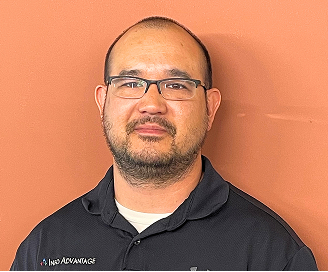
Chris Chan
Sr. Director of Solution Sales

Mitch Weller
Executive Vice President

Nick Wetherwax
Sr. Director of Technical Solutions

Mike Minch
Client Success Representative

Jacob Weller
L1 Engineer

Rikki Weller
Marketing Executive

Brian Moss
Solution Sales Representative

Chris McDonald
L2 Engineer

Matt Frosini
L2 Engineer
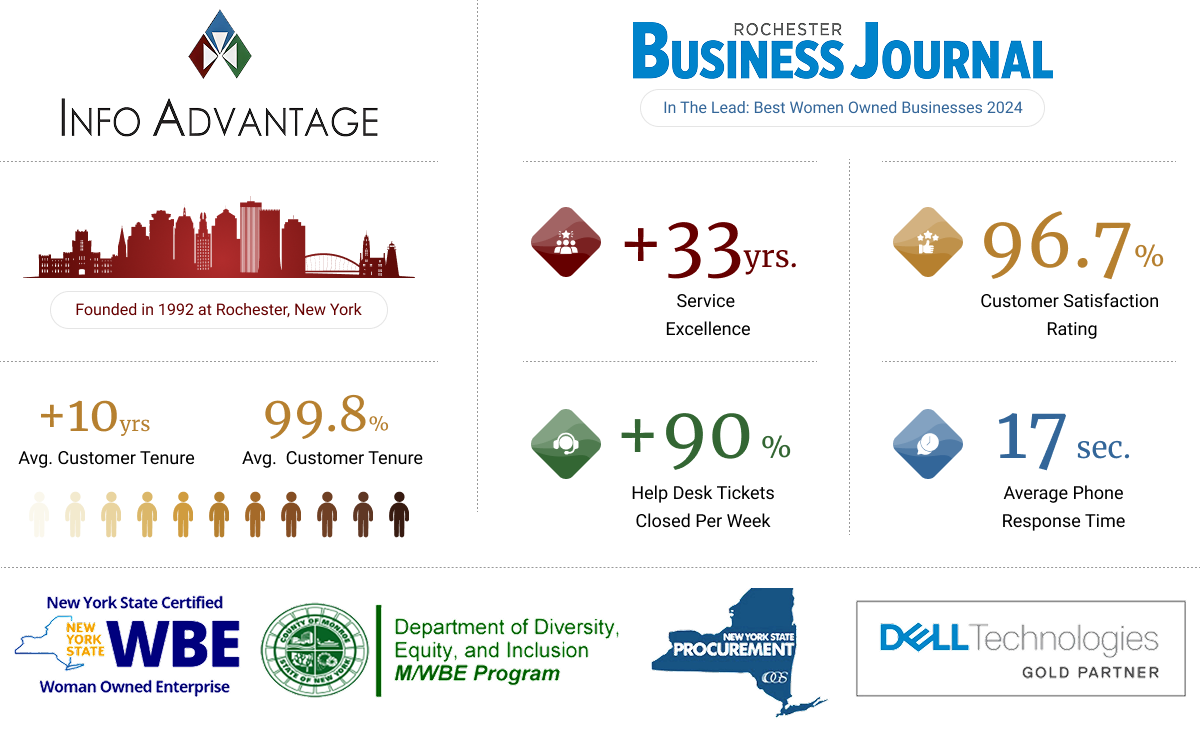
One Partner For Every Piece Of Technology
Without reliable IT services, small technology issues can quickly disrupt daily work. Slow systems, security gaps, unclear vendor responsibilities, and repeated downtime can leave employees frustrated, delay customer service, and make growth harder to manage.
Information Advantage helps Syracuse businesses bring support, security, networks, cloud systems, and technology planning under one accountable team. We monitor systems, respond when problems arise, coordinate improvements, and help reduce avoidable disruptions. The goal is simple: keep your technology dependable, secure, and easier for your business to manage without adding more work for your staff.
What Our IT Services Cover
Network monitoring flags issues before they slow down daily work.
Layered cybersecurity protection helps guard against common threats.
Cloud backups designed to help protect files if hardware fails.
Help desk support answers questions without long wait times.
IT consulting aligns technology decisions with real business goals.
Vendor coordination removes the need to manage multiple contacts.
Compliance support helps keep documentation organized and current.
We love conversations with our clients but it's our work that does the real talking.
“We needed help it was only a phone call away”
“We enjoyed another successful year at Hoag Library in no small part due to our relationship with Info Advantage. With the help of Johnathan and Linda we replaced many of our computers this year and have finally gotten all of our equipment onto a three year cycle for replacement. The installation of the new computers was handled in house knowing that if we needed help it was only a phone call away. Jeremiah was instrumental in helping us get all of the new equipment online and swapping out some other equipment with items that were at the end of life. Other times we have depended on Jacob to help us figure out why we were having problems. (an unknown power outage was one cause.) and he and Kris reset programs when we could not make successful updates. We were also unable to catalog new books when the dedicated computer went down. We sent the computer to IA , they performed “magic” and Jacob returned it and reinstalled it until our new computers came in.”

BETTY SUE MILLER
Director Hoag Library
“Words can’t describe the difference Info Advantage has made."
“I have been working with the Info Advantage team for a little over a year now as the IT Manager for VP Supply Corp. Words cannot describe the difference Info Advantage has made in my ability to do my job and protect our network and information assets. What started as a hardware vendor has now evolved into providing MSSP services to better protect our network – and we could not be happier with the quick return on investment this has given us. I would like to give a special shout-out to the members of the Info Advantage team who have not only done their job exceptionally well but have also mastered the soft skills and make me feel as though I can always reach out if we need them. Johnathan, Chris Chan, Chris McDonald, and Nick Wetherwax have been outstanding over the past year. With continued success like this VP Supply will have Info Advantage as a partner for many, many years to come!”

ADAM DEKRAMER
IT Manager VP Supply Corp
“I’ve worked with Info Advantage for 12 yrs. across multiple companies.”
“I have worked with Info Advantage over the past 12 years at a couple of companies. This year, Info Advantage helped me deploy a new VMWare / EMC environment for my current employer. During the selection process, they were very responsive with quote changes, responses to questions and updates explaining every aspect of the roll-out. They were very willing to take my current level of knowledge into consideration in the quoting process and their quotes were very competitive. Once awarded the project, Info Advantage proceeded very quickly to order and install the hardware in agreed time with on-hands training and system documentation for me. I would personally recommend Info Advantage for any project.”
CLINT SCHWAB
Durst Imaging / Rochester, NY
iaGuardianMSP Solutions Builder
See what IT should actually cost your business. Use our calculator to estimate your monthly budget based on your team size, needs, and security requirements. Click the button to get your estimate.

Is Technology Slowing Your Business Down?
Without reliable IT services, businesses can face slow computers, missed security updates, failed backups, and software that does not work properly together. Employees may spend hours trying to solve problems, contact different vendors for help, or wait while no one takes responsibility for fixing the issue. When the problem involves several systems that need to work together more effectively, our IT solutions take a broader look at how those technologies connect.
Over time, these problems can cause missed deadlines, lost files, security risks, and frustrated customers. Instead of focusing on their work, employees are forced to work around unreliable technology, making the business less productive and more difficult to manage.
Why Choose Us As Your IT Services Provider?
We start by reviewing how your team uses technology, where problems occur, and which systems may create security or reliability risks. This gives us a clear picture of what needs attention before we recommend changes.
From there, we manage support, monitoring, security, software, and technology planning through one consistent point of contact. We explain recommendations in plain language, coordinate updates carefully, and build an IT services plan around your priorities, budget, and daily operations so your technology stays dependable and easier to manage as your business changes, develops, and grows.

How Our IT Services Work

Network Management
We monitor firewalls, servers, and connections across the network so businesses in Syracuse can rely on stable, consistent performance for daily tasks and communication between busy teams.

Cloud Support
We manage cloud platforms and backups so files stay accessible, storage stays organized, and businesses in Syracuse can work from anywhere without losing track of data.

Cybersecurity Protection
Our IT services apply layered defenses to guard email, devices, and data, helping businesses in Syracuse reduce exposure to the phishing attempts and malware that target smaller companies.

IT Consulting
We review current systems and future plans together, helping businesses in Syracuse budget for technology in a way that supports growth instead of reacting to it.
Our IT Services
Reliable IT services cover more than fixing problems when they happen. Here is how we help businesses in Syracuse keep their technology supported, secure, and ready for daily work.
Network Management
A stable connection should feel invisible, not like something the team has to think about between meetings. Too often, a slow network or a dropped connection interrupts calls, stalls file transfers, and leaves people refreshing a screen instead of working. Our IT services monitor network performance continuously, catching congestion and hardware issues before they turn into a dropped call or a stalled upload.
Continuous monitoring of routers, switches, and firewalls.
Bandwidth management that keeps daily traffic moving smoothly.
Wireless coverage checks across offices and shared spaces.
Documentation of network changes for easier troubleshooting later.
Cybersecurity Services
Every business wants to trust that a suspicious email gets caught before anyone clicks it. Instead, many teams find out about a threat only after a strange login alert or a locked file shows up on someone's screen. Our IT services layer email filtering, endpoint protection, and monitoring together so common threats get caught earlier, before they reach a person's inbox.
Email filtering that reduces phishing attempts reaching your team.
Endpoint protection installed across laptops, desktops, and servers.
Multi factor authentication set up on critical business accounts.
Ongoing monitoring for unusual login activity and access attempts.
Cloud Solutions
Files should be wherever the team needs them, Our IT services organize cloud environments so access stays controlled and the tools a team already uses actually work together. Businesses that rely heavily on Microsoft 365 can also explore our Microsoft 365 consulting for more focused guidance around that environment.
Cloud platform setup configured around how your team works.
Storage organization that keeps shared files easy to locate.
Permission management so the right people see the right data.
Ongoing cost review to avoid paying for unused cloud storage.
Data Backup and Recovery
A backup should be the thing nobody thinks about until the day it matters, and then it should just work. Too many businesses learn their backup was incomplete or outdated only after a server crash or a ransomware attempt. Our IT services test backups on a regular schedule, so a bad afternoon does not turn into a lost week of client records.
Automated backups scheduled outside of business hours.
Regular restore testing to confirm backups actually work.
Offsite copies designed to help protect against local outages.
A documented recovery plan ready before it is ever needed.
IT Help Desk
When something breaks, a business wants a real person on the line, not a ticket number and a long wait. Too many teams get stuck explaining the same issue twice before reaching someone who can actually fix it. Our IT services connect businesses in Syracuse to responsive IT support, giving employees a clear place to turn when day-to-day technology problems interrupt their work.
Direct access to a help desk during business hours.
Remote support that resolves most issues without a site visit.
Clear ticket updates so nobody wonders about a request's status.
Escalation paths for issues that need deeper technical attention.
Technology spending should feel like a plan, not a series of reactive purchases made under pressure. Many businesses buy new software or hardware only after something fails, without ever stepping back to look at where the budget is actually going. Our IT services include regular planning sessions that connect technology spending to where the business is actually headed.
Quarterly reviews of current systems and upcoming needs.
Budget planning that maps costs against business priorities.
Guidance on which upgrades matter now versus later.
A technology roadmap that supports upcoming growth plans.
Industries We Empower
With decades of hands-on experience across regulated and fast-moving industries, we understand the unique risks you face. Our deep industry expertise allows us to deliver cybersecurity-first, compliance-ready IT solutions tailored to your environment and built to protect what matters most.

Financial Service Organizations

Healthcare &
Medical

Manufacturing &
Distribution

Legal Firms &
Attorneys

Nonprofit
Organizations

Professional
Services
More Insights
Stay connected with all of the latest IT services trends and alerts by subscribing to our blog.
What to Do After a Cyberattack: A Step-by-Step Guide for Businesses
Here is what really helps in a cyberattack: knowing in advance what to do. The businesses that navigate these situations best are almost never the ones with the most sophisticated defenses. They are the ones who had a plan, knew who to call, and did not lose critical minutes to panic and confusion.
This guide gives you that framework.
The First Thing to Do: Stay Calm and Do Not Make It Worse
The instinct during a cyberattack is to act immediately. That instinct, without guidance, often makes things worse. Deleting files, shutting everything down without a plan, or restoring systems before the threat is contained can all extend the damage rather than limit it.
The first action is not a technical one. It is to pause, notify the right people, and start the response process in order.
Step 1: Isolate, Don't Shut Down
If systems are actively compromised, the priority is to disconnect infected devices from the network, not necessarily to shut them down completely. Isolation stops the spread. An unplanned full shutdown can destroy forensic evidence needed to understand what happened and complicate recovery.
Disconnect affected devices from Wi-Fi and network cables. If a device appears to be actively spreading something, powering it off may be warranted, but do so with awareness that this choice exists rather than as an automatic reaction.
Step 2: Call Your IT Provider Immediately
This is the call that changes the trajectory of what happens next. If you are an Info Advantage client, this is also where the Info Advantage support line connects you to a human being within seconds, someone who knows your environment and begins coordinating the response from that first call.
Do not try to investigate or remediate on your own before making this call. The response team needs to assess the situation before changes are made.
Step 3: Identify What You Are Dealing With
The response team will work to determine what type of incident is occurring. Ransomware, a phishing-based credential theft, an unauthorized access event, and a data exfiltration attempt all require different response approaches. The assessment drives the next steps rather than a generic script.
What you can help with at this stage: describing what you noticed first, when you noticed it, and which systems or users appear to be affected.
Step 4: Notify Stakeholders Appropriately
Depending on what has occurred and what data may be involved, notifications may be required. According to the FTC's cybersecurity guidance for small businesses, businesses should have an incident response plan that includes knowing who to notify and when, including potentially affected customers, insurance providers, and in some cases regulatory bodies.
Not every incident requires external notification, but knowing the thresholds in advance means this decision does not get made under maximum stress without any preparation.
Step 5: Contain and Begin Remediation
Once the scope of the incident is understood, the response team moves to contain it, removing the attacker's access, identifying how they got in, and beginning the process of cleaning affected systems. This is technical work that happens in coordination with your IT provider.
What the business needs to do during this phase: support the response team with access and information, communicate internally with staff about what is happening, and avoid restoring systems before you get the all-clear.
Step 6: Restore From Clean Backups Only
CISA's incident response guidance is direct on this point: restore systems only after the threat has been fully removed and clean backups are confirmed. Restoring too early can reintroduce the attacker. Your IT provider will verify backup integrity before reconnecting systems.
This is one of the clearest illustrations of why tested backups matter so much before anything happens. The backup that was verified during a routine test is the backup you can trust during recovery. The one that was never tested is a source of uncertainty at exactly the wrong moment.
Step 7: Conduct a Post-Incident Review
Once systems are restored and operations are stable, the most important conversation is the one about what happened and what changes. How did the attacker get in? What would have caught it earlier? What protections need to be added or changed?
This review is not about assigning blame. It is about making sure the same path cannot be used again, which is the lasting outcome of a well-handled incident.
What Having an IT Partner Changes About This Process
The difference between a business that navigates a cyberattack well and one that does not often comes down to whether a human response started in the first minutes rather than the first hours. At Info Advantage, a live human answers within seconds, knows the environment, and begins coordinating immediately. The calm, step-by-step response starts with that first call, and it runs all the way through post-incident review and the changes that come out of it.
Preparation is what calm looks like in a crisis.
Schedule a call with Info Advantage and find out what your incident response plan looks like, before you need it.
Frequently Asked Questions
Should we shut everything down immediately if we think we are under attack? Not necessarily. Isolation of affected devices from the network is often more appropriate than a full shutdown, which can destroy forensic evidence. Your IT provider should guide this decision from the first call.
What if we do not have an IT provider when an attack happens? Contact CISA's 24/7 reporting line or the FBI's Internet Crime Complaint Center (IC3) for federal resources. Having a provider in place before an incident makes an enormous difference in response time and coordination.
How do we know if customer data was exposed? The post-incident investigation determines scope, which is why containing and investigating before restoring is critical. Your IT provider and potentially legal counsel can help assess notification obligations.
Can we restore from backup immediately? Only after the threat has been fully removed and backups are verified as clean. Restoring too early is one of the most common mistakes in cyberattack response and can reintroduce the attacker.
How long does recovery typically take? It depends on the type and scope of the incident, the quality of backups, and how quickly the threat was contained. Businesses with tested recovery plans and clean backups recover far faster than those without. Ransomware recovery without a good plan can take weeks or longer.

Frequently Asked Questions About IT Services in Syracuse
What is IT services?
IT services cover the ongoing management of a business's technology, including networks, cybersecurity, cloud tools, data backup, and help desk support. Our IT services bring those pieces together under one plan so a business in Syracuse has a single partner instead of separate vendors for each part of its technology.
What is the difference between IT services and IT support?
IT support usually refers to help desk response when something breaks, while IT services describe the broader, ongoing management of a business's entire technology environment. Our IT services include support as one part of a larger plan that also covers security, cloud, and consulting.
How much do IT services cost for a small business in Syracuse?
Costs depend on the number of users, the systems involved, and the level of support a business needs. We review your current setup and goals before recommending a plan, so the IT services you get are built around your budget rather than a generic package.
Do you offer remote or on site IT services?
We provide both. Most day to day IT services get resolved remotely, while certain issues, like hardware installs or network changes, are handled with an on site visit from our team in Syracuse.
How is an MSP different from hiring an in house person for IT services?
An MSP, or managed service provider, gives a business access to a full team of specialists instead of relying on one person to cover networking, security, and help desk support alone. Our IT services function as that outsourced team, backing up the internal staff a business may already have.























Get Started Today!
If your business in Syracuse is outgrowing a patchwork of vendors or a single overworked technician, our IT services are built to bring everything under one roof. As a local IT company, we start with a conversation about what is actually running your technology today, not a sales pitch about what you should buy next.
Location
155 Sanford St Rochester,
NY 14620
Company
© 2026 Info Advantage Inc. Built in partnership with Tech Pro Marketing. | Privacy Policy | Area we serve


